01 / A little direction
Dog training plans.
A little direction.
Follow a training path with guided lessons, manageable goals and a weekly plan that helps you return to the next useful step.
Explore the training planYour pocket training companion
DogPath brings your plan, practice and progress together. Choose one useful skill, follow the lesson and come back with a clear next step.
From puppy foundations to calmer walks, DogPath helps you organise short, reward-based practice. Use guided lessons, a weekly training plan and focused programs without piecing everything together yourself.
Free to download. Features and offers may vary by platform and app version. Check the current store listing and in-app offer before purchasing.
We make DogPath. Dog Train Club and DogPath are published by Rocket Digital Limited.
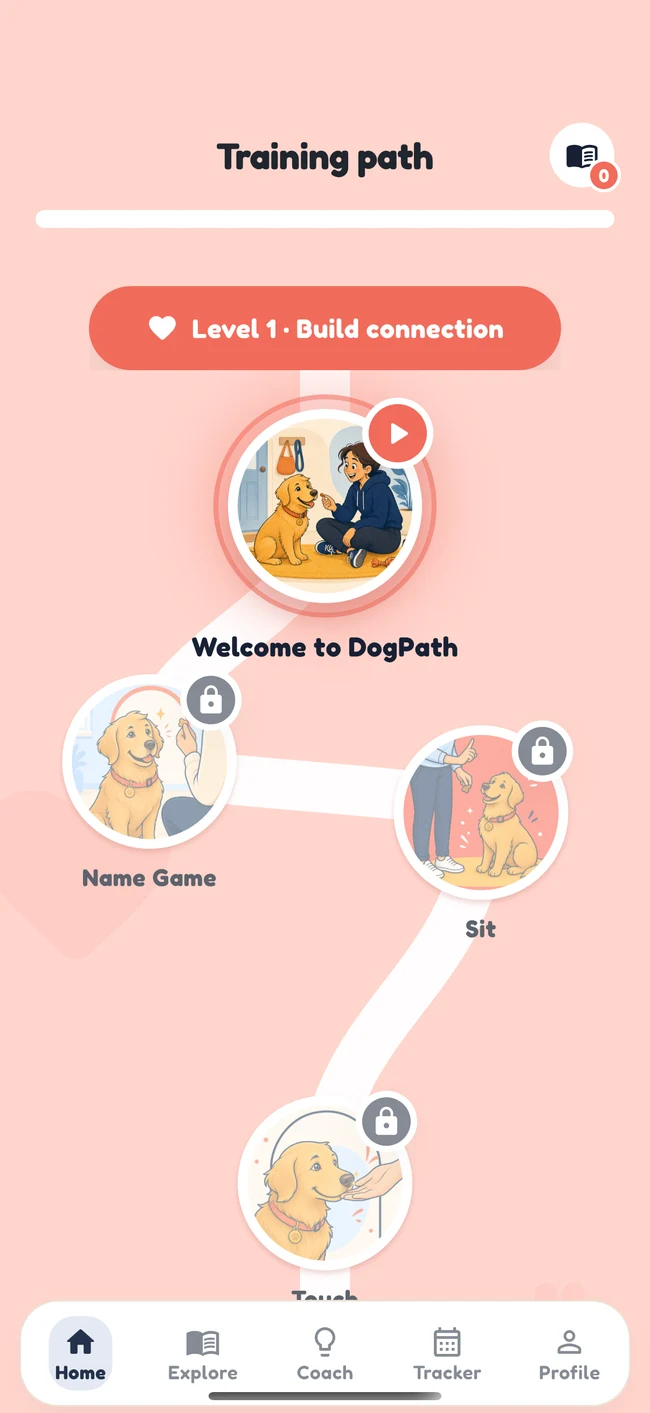
Inside the app
01 / A little direction
Follow a training path with guided lessons, manageable goals and a weekly plan that helps you return to the next useful step.
Explore the training plan02 / One everyday challenge
Use a focused DogPath program to organise everyday practice around a specific challenge, with a clear action to return to.
Explore focused programs03 / Between the lessons
Use the DogPath AI coach to organise everyday training questions with context, while keeping health and safety decisions with professionals.
Explore the AI dog coach04 / The useful little extras
Explore DogPath’s clicker, whistle, session timer, walk tracker and potty log, plus breed guidance and progress records.
Explore training toolsDogPath in everyday life
Explore how the app fits around preparation, a short lesson and an honest review of what happened.
A dog training app is most useful when it supports a specific part of your routine. You might know the skill you want to teach but need a clear lesson. You might have several goals and need help choosing a starting point. Or you might want a more consistent place to return to after a busy day.
Begin with the ordinary moment you care about: a more comfortable walk, a clear puppy routine or a small response to a familiar cue. Describe what you can actually observe. “Turns towards me when I say their name nearby” is a usable starting goal. “Always listens” covers too many situations to turn directly into one session.
DogPath brings guided lessons, a training path, focused programs, an AI coach and practical tools into one app. You do not need every feature for your first exercise. Choose the part that makes the next action clearer and leave the rest available for when it has a purpose.
The examples on this page describe ways to organise practice. They are not screenshots of additional features, a promise of individual results or a replacement for a professional plan where your dog needs one.
Read the exercise, identify the first manageable response and prepare the space. Put suitable rewards within reach and check any equipment. If you need to handle a leash, a phone and food, rehearse the hand movements before trying them with the dog.
Keep your attention on your dog and the surroundings. A short, comfortable repetition can be enough to begin. The app holds the instructions, but you still decide whether the setting and your dog’s response make continuing appropriate. Put the phone somewhere secure when safe handling needs both hands.
Return to the plan and record what you completed honestly. Keep a brief observation for your own review: where you practised, what happened and what you will repeat. A completed activity is a useful record, but it does not establish that the behaviour works in every environment.
For example, after a quiet indoor recall, your next choice may be the same nearby response again. You do not need to increase distance simply because the previous repetition went well. Continuity comes from returning to an appropriate next step.
These roles can complement each other without all being used in one session. A puppy household might focus on the potty log and one simple lesson. A walker might use a guided exercise before an outing, then review the route afterwards. A handler who is unsure how to simplify a step might ask a specific coach question before choosing the next exercise.
When several features seem relevant, start with the smallest useful combination. The goal is less uncertainty about what to do, not more time spent managing the phone.
You can read every Dog Train Club guide without downloading DogPath. Use the guide to understand the setup, the exercise and the situations that call for an easier version. If you prefer a guided sequence and app tools alongside that reading, DogPath offers a place to organise ongoing practice.
A walking example
Read: understand slack in the leash and comfortable reward delivery.
Prepare: choose a quiet stretch and a small starting goal.
Practise: follow an appropriate lesson and observe the dog.
Review: distinguish the route you walked from the short part used for training.
Keep the record specific enough to recreate. A route can be the same while the crowds, weather and distractions differ. The information you add through observation helps you decide whether to repeat the setup or change it.
For a concern involving pain, severe distress, aggression or safety, the next step is appropriate individual help. An app and a general guide cannot assess the full situation. They can support ordinary practice alongside professional advice when that practice is suitable.
DogPath is free to download; some features require payment. Before buying, read the offer shown in the current app and store listing. Check what is included, the billing period, any trial conditions and the renewal information. This website does not promise a fixed price or that every feature is included without payment.
Different features can involve different permissions or consent choices. Active walk tracking involves location access; AI and photo features have their own current information in the app. Read those details before deciding which features to use. You can choose a simpler practice routine when a tool is not needed.
For technical questions, use the support guide. Include your device, app version, the feature involved and a short description of what happened. Do not send passwords or payment-card details.
Choose the App Store or Google Play button for your device. After opening the listing, verify the current requirements and offer there. Keep your first session modest: one useful goal, one prepared setting and one observation to carry into the next day.
Before you download
DogPath is an everyday planning and practice companion. Use it alongside the support your individual dog needs.
DogPath is available through the App Store and Google Play. Check the listing for current device compatibility and availability in your country.
The app is free to download, with optional paid features and subscriptions. The current offer, included content, trial conditions and renewal terms are shown in the app before purchase.
No. AI suggestions can be incorrect and cannot assess your dog in person. For pain, sudden changes, severe distress, aggression or safety concerns, contact your veterinarian and a qualified behaviour professional.
Yes, everyday practice can be adapted for adult dogs too. Work within your dog’s physical comfort, learning history and professional advice.
Find the DogPath app privacy policy through its App Store or Google Play listing. Review it for information about app features, AI inputs, photos and location permissions.